The Réglages (Settings) open in a separate window: menu Obscura Trace › Réglages…, or ⌘,. They have three sections: “Suppression” (Deletion), “Catalogue” (Catalog) and “Mises à jour” (Updates). Settings are saved in the catalog; they are reread each time the window opens.
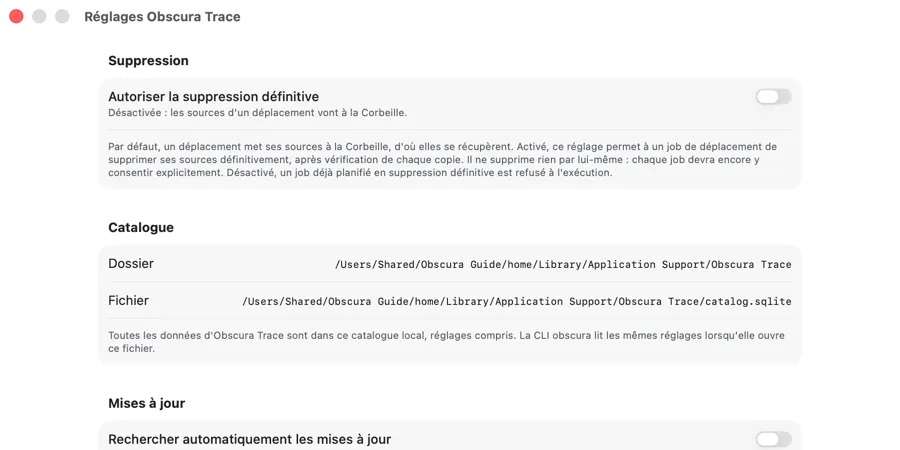 The Réglages window: “Suppression” (Deletion) and “Catalogue” (Catalog) sections; “Mises à jour” (Updates) follows further down.
Deletion
The “Autoriser la suppression définitive” switch
The “Autoriser la suppression définitive” (Allow permanent deletion) switch shows its state below it:
- “Désactivée : les sources d’un déplacement vont à la Corbeille.” (Disabled: the sources of a move go to the Trash.) (the default)
- “Activée : un job peut supprimer définitivement ses sources s’il y consent.” (Enabled: a job can permanently delete its sources if it consents.) (in red)
The explanation shown:
“Par défaut, un déplacement met ses sources à la Corbeille, d’où elles se récupèrent. Activé, ce réglage permet à un job de déplacement de supprimer ses sources définitivement, après vérification de chaque copie. Il ne supprime rien par lui-même : chaque job devra encore y consentir explicitement. Désactivé, un job déjà planifié en suppression définitive est refusé à l’exécution.”
(Meaning: By default, a move puts its sources in the Trash, from which they can be recovered. When enabled, this setting allows a move job to delete its sources permanently, after each copy is verified. It deletes nothing by itself: each job will still have to consent explicitly. When disabled, a job already planned with permanent deletion is refused at execution.)
Enabling: an explicit confirmation
Turning the switch on saves nothing right away. A dialog opens:
- title: “Autoriser la suppression définitive ?” (Allow permanent deletion?)
- message: “Une suppression définitive ne passe pas par la Corbeille : les fichiers supprimés ne pourront être récupérés ni par Obscura Trace ni par le Finder. Ce réglage ne supprime rien maintenant ; chaque job devra encore y consentir.” (A permanent deletion does not go through the Trash: deleted files cannot be recovered by Obscura Trace or by the Finder. This setting deletes nothing now; each job will still have to consent.)
- buttons: “Autoriser la suppression définitive” (Allow permanent deletion) (red) and “Annuler” (Cancel).
The Return key chooses “Annuler” (Cancel): the irreversible is not made possible through the default key. Only a click on “Autoriser la suppression définitive” saves the setting. Closing the dialog grants nothing.
Disabling: immediate
Turning the switch off is immediate, without confirmation: it can only withdraw a permission. A plan already computed with permanent deletion will then be refused at execution, with the message “Suppression définitive désactivée” (Permanent deletion disabled) — “La suppression définitive est désactivée dans les Réglages. Rien n’a été supprimé.” (Permanent deletion is disabled in Settings. Nothing has been deleted.)
Three successive locks
Even when allowed here, a permanent deletion only takes place if:
- the setting is enabled (here, or through
obscura settings); - the transfer is a move, and you have chosen “Supprimer définitivement les sources” (Permanently delete the sources) and checked the transfer’s consent box;
- on the confirmation screen, you have checked “Je reconnais que cette opération est irréversible.” (I acknowledge that this operation is irreversible.) and clicked the irreversible button.
The setting is reread at execution time: if it has been disabled in the meantime, nothing is attempted.
Every change to the setting is recorded in the Activité (Activity) screen.
Error messages
- “Le réglage n’a pas été enregistré. Détail : …” (The setting was not saved. Detail: …) — the write failed; the switch shows the value actually saved in the catalog, never the one you requested.
- “Les réglages ne se lisent pas” (The settings cannot be read) — the setting could not be read; the switch is not shown rather than showing an assumed value. Close and reopen the window to try again.
Catalog
The section shows the catalog’s “Dossier” (Folder) and “Fichier” (File), which can be selected to copy them:
- Folder:
~/Library/Application Support/Obscura Trace - File:
~/Library/Application Support/Obscura Trace/catalog.sqlite
(the paths are shown in full, with your user folder).
“Toutes les données d’Obscura Trace sont dans ce catalogue local, réglages compris. La CLI obscura lit les mêmes réglages lorsqu’elle ouvre ce fichier.” (All of Obscura Trace’s data is in this local catalog, settings included. The obscura CLI reads the same settings when it opens this file.)
To back up or reset the catalog, see chapter 11.
Updates
- “Rechercher automatiquement les mises à jour” (Automatically check for updates) switch, off by default.
- “Désactivée : aucune vérification sans votre demande.” (Disabled: no check unless you ask.)
- “Activée : une nouvelle version vous sera proposée dès sa publication.” (Enabled: a new version will be offered to you as soon as it is published.)
- Explanation: “Obscura Trace ne contacte aucun serveur tant que ce réglage est désactivé, sauf si vous choisissez « Rechercher les mises à jour… » dans le menu Obscura Trace. Activé, il consulte une fois par jour la liste des versions publiées, sans rien envoyer de vos photos ni de votre catalogue. Une mise à jour trouvée n’est jamais installée sans votre accord.” (Meaning: Obscura Trace contacts no server while this setting is disabled, unless you choose “Rechercher les mises à jour…” (Check for Updates…) in the Obscura Trace menu. When enabled, it checks the list of published versions once a day, without sending anything from your photos or your catalog. An update that is found is never installed without your consent.)
This setting is not stored in the catalog: it is kept in the app’s preferences (see chapter 11).