General rule: when in doubt, the app keeps. None of the situations below causes an original to be lost; at worst, a file stays in place or a partial copy waits to be cleaned up.
A disk was unplugged during a transfer
The transfer stops cleanly. The screen shows “Volume indisponible” (Volume unavailable) and “Transfert interrompu (VOLUME_UNAVAILABLE) : …” (Transfer interrupted (VOLUME_UNAVAILABLE): …).
- Plug the disk (source or destination) back in.
- Click “Reprendre” (Resume).
Resuming reads the journal, undoes the operation that was in progress (its partial .obscura-part copy is removed), then restarts the plan. Files already copied and verified are not copied again. No destination file carries its final name without having been verified.
If you click “Reprendre” (Resume) before reconnecting the source disk, nothing is read or written: the transfer stays interrupted (“Volume indisponible” (Volume unavailable)) and is still offered. Reconnect it, then “Reprendre” again.
After a move, the removed sources are no longer counted or offered for review, without a new analysis. If a file disappeared from the source outside the app and a new plan has to compare it with an occupied destination, that operation goes “en revue” (in review) (“source absente depuis l’indexation” (source missing since indexing)) instead of making the whole plan fail.
The destination disk is full
- Before the plan: the app checks the available space and refuses to create the plan — “Espace insuffisant à destination” (Insufficient space at destination): “Le plan demande X, plus une marge de Y ; la destination n’offre que Z. Rien n’a été écrit.” (meaning: The plan requires X, plus a margin of Y; the destination offers only Z. Nothing has been written.)
- During execution (the space decreased in the meantime): “Disque de destination plein” (Destination disk full). Free up some space, then “Reprendre” (Resume).
The app was quit, or stopped, during a transfer
The journal recorded each operation before performing it: nothing is lost, and no file was removed from the source without its copy having been verified.
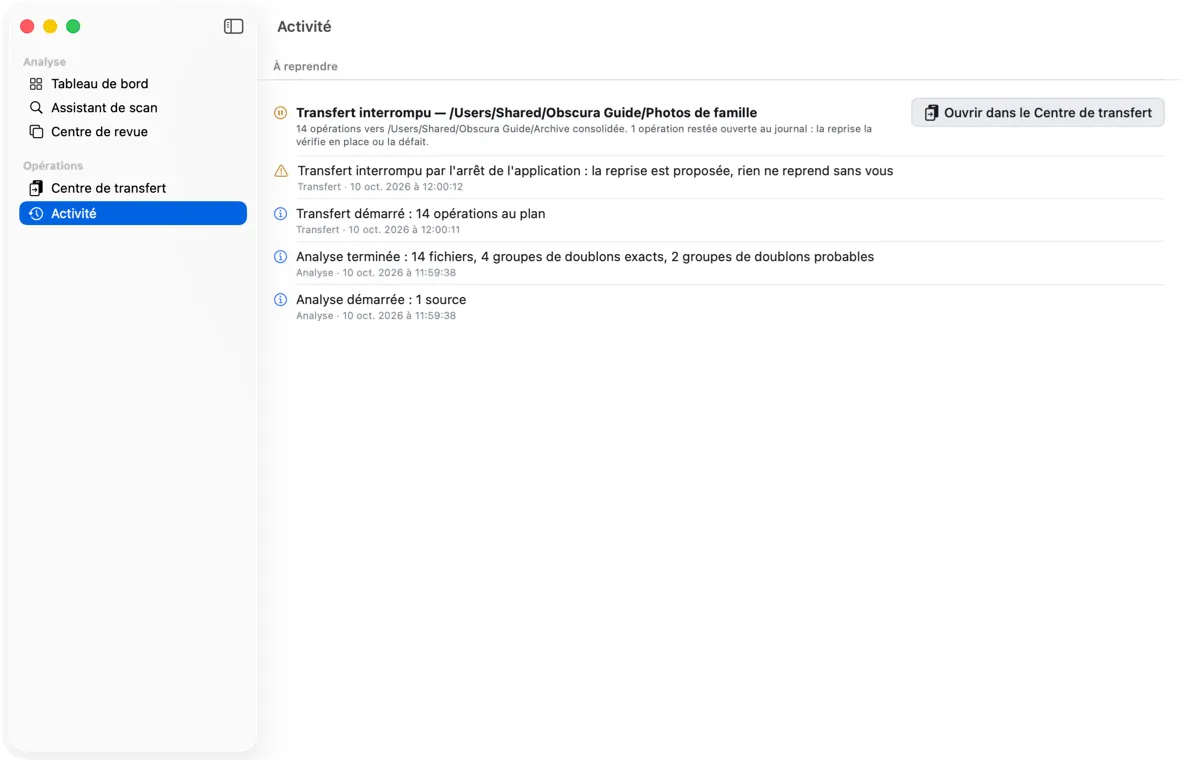 At the next launch: the “À reprendre” (To resume) section of Activité (Activity) reports the interrupted transfer.
In the app — at the next launch, nothing resumes on its own. The Activité (Activity) screen shows at the top a “À reprendre” (To resume) section with “Transfert interrompu — source” (Transfer interrupted — source), the number of operations and, if there are any, the operations left open. Click “Ouvrir dans le Centre de transfert” (Open in the Transfer Center): the screen shows “Transfert interrompu lors d’une session précédente” (Transfer interrupted during a previous session) and the plan. Click “Reprendre” (Resume): the operation left open is verified in place or undone, then the plan completes; what was already verified is not copied again, and for a move, the sources whose copy was verified are removed in turn. The Centre de transfert (Transfer Center) opened from the sidebar, with no transfer being prepared, also opens directly on the interrupted transfer.
If the destination disk is formatted as exFAT or FAT32, an incomplete file may have been left under its final name: the app neither overwrites nor removes it. After resuming, Activité shows “N fichiers non copiés : le nom final est déjà occupé” (meaning: N files not copied: the final name is already taken) with the paths concerned; check these files, remove the incomplete ones yourself, then start a new transfer.
A transfer interrupted by a version of the app earlier than this one is not offered: finish it from the command line.
From the command line (advanced users, app quit) — obscura recover-transfers … --executor copy-first handles the operation left open (copy verified in place or undone, .obscura-part file removed), then obscura execute on the same plan finishes the rest without copying again what is verified. Reminder: the CLI never moves a source to the Trash. See chapter 8.
Any *.obscura-part file left at the destination is an unfinished copy, never an original. It is ignored by analyses.
The app was quit, or stopped, during an analysis
No file was touched: the analysis only reads. Batches already recorded are kept.
At the next launch — whether the analysis was in progress, paused, or only prepared — the Activité (Activity) screen shows “Analyse interrompue — sources” (Analysis interrupted — sources) in the “À reprendre” (To resume) section, with two buttons:
- “Reprendre” (Resume): the same analysis starts again, on the same sources and with the same options, and the Assistant de scan (Scan Assistant) shows its progress; files already inventoried and unchanged are not read again.
- “Abandonner” (Abandon): the analysis is closed; batches already recorded are kept, and the Tableau de bord (Dashboard) no longer shows the “en cours d’établissement” (being established) banner.
An analysis interrupted by an earlier version of the app kept neither its sources nor its options: only “Abandonner” (Abandon) is offered; then start it again from the Assistant de scan.
If another analysis is already running, “Reprendre” (Resume) is refused and the Activité (Activity) screen says so: “Une autre analyse est en cours : attendez sa fin, ou annulez-la dans l’Assistant de scan, puis reprenez celle-ci. Elle reste proposée ici.” (meaning: Another analysis is in progress: wait for it to finish, or cancel it in the Scan Assistant, then resume this one. It remains offered here.)
“Le catalogue est déjà ouvert”
Another Obscura Trace window (opened with open -n, for example) or an obscura command is using the catalog. Only one process writes to a catalog: the app refuses to open it a second time, without modifying anything, rather than take the other’s work in progress for interrupted work. Close the other window, or wait for the command to finish, then “Réessayer” (Retry). On the command line, the same refusal reads “refusé : CATALOG_LOCKED : …” (refused: CATALOG_LOCKED: …) (exit code 75).
The disk is formatted as exFAT (or FAT)
Analysis and transfer work. A few particularities:
- it is a weak volume: files renamed or moved outside the app are recognized by their content, when the app knows their fingerprint (see chapter 9);
- the
._*files that macOS creates on these disks are ignored automatically; - batch renaming (command line) is impossible there: it fails without changing any name;
- if you rename the root folder of the source itself, the app does not follow it: designate it again with “Ajouter un dossier…” (Add a folder…);
- two exFAT disks formatted together, or two copies of the same disk image, can carry the same identifier: see “Volume jumeau monté” (Twin volume mounted) below.
The source or destination is on a NAS (network share)
Network volumes measured, on a local-network NAS mounted through the Finder:
| Share | Analyze (source) | Transfer to (destination) | Batch renaming |
|---|---|---|---|
SMB (smb://…, SMB 3) | yes | yes | no |
AFP (afp://…) | yes | no: each file fails with “métadonnées non conservées” (metadata not preserved), nothing is written | no |
- SMB, destination: each copy is created under a name that cannot overwrite an existing file, read back, then given its original date. If another computer creates the same name at the same moment, its file is kept and yours is reported as “nom final déjà occupé” (final name already taken).
- Share unmounted during a transfer (ejected, even forcibly): the transfer stops as “interrompu” (interrupted). Remount the share the same way (same server name in the Finder), then resume: files already verified are not copied again. Mounted under another name (for example its IP address instead of its name), the share is refused, like another disk: the app never writes anywhere other than on the volume it saw at the time of the plan.
- After a cutoff, an incomplete file may remain under its final name: the app neither overwrites nor removes it, and the Activité (Activity) screen names it (as for exFAT, above).
- A file this Mac has just written to an SMB share may change date the first time it is reopened: if analyzed right away, it may be reported as “source modifiée” (source modified) (
SOURCE_DRIFT) at transfer time. Run the analysis again. - AFP is obsolete (macOS has announced its removal): for a destination on a NAS, mount the share over SMB (Finder › Go › Connect to Server,
smb://nas-name/share). - Batch renaming (command line) is impossible on SMB and AFP: these shares do not guarantee a rename without overwriting; the preview reports it and no name changes.
- The
._*files that macOS creates on these shares are ignored automatically.
Files are unreadable or corrupted
The analysis does not stop because of it. Each unreadable file is logged with its reason, and counted once in the “Résultat” (Result) card (“N fichier(s) illisible(s) consigné(s)” (N unreadable file(s) logged)). Find them in the Centre de revue (Review Center), filter “Fichiers corrompus” (Corrupted files); a corrupted file no longer appears under “Fichiers uniques” (Unique files).
A truncated JPEG (interrupted copy, memory card pulled out) often opens with the bottom of the image gray: the app recognizes it by the absence of its end marker and logs it as corrupted (“JPEG tronqué : fin d’image (EOI) absente” (Truncated JPEG: end of image (EOI) missing)).
A folder could not be read
The “Résultat” (Result) card names it (“1 dossier(s) non lisible(s) … : chemin” (1 unreadable folder(s) …: path)), so does the Activité (Activity) screen, and the source’s transfer plan recalls it: its content is neither inventoried nor transferred, and nothing there is declared missing. Give yourself read permission (Finder, Get Info, Sharing & Permissions), then run the analysis again.
The app neither modifies nor deletes these files. Check them with your usual software; if they can be recovered from another copy, an exact duplicate will point it out.
Common error messages
At launch
| Message | What to do |
|---|---|
| “Le catalogue ne s’ouvre pas” — “Obscura Trace n’a pu ni ouvrir ni créer son catalogue dans « … ». Aucun autre emplacement n’a été utilisé. Détail : …” (meaning: The catalog does not open — Obscura Trace could neither open nor create its catalog in “…”. No other location was used. Detail: …) | Check that the ~/Library/Application Support/Obscura Trace folder is accessible and that the Mac’s disk is not full, then “Réessayer” (Retry). See chapter 11. |
In the Assistant de scan (Scan Assistant)
In the Centre de revue (Review Center)
| Message | What to do |
|---|---|
| “Groupe recalculé” (Group recomputed); “ce groupe n’existe plus sous cette forme : il a été recalculé” (meaning: this group no longer exists in this form: it has been recomputed) | An analysis recomputed the groups. Switch filters and come back to reload the list. Nothing was saved. |
| “ce groupe est ignoré : rouvrez-le avant de décider” (meaning: this group is ignored: reopen it before deciding) | Click “Rouvrir le groupe” (Reopen the group). |
| “Le catalogue n’a pas pu être lu” (The catalog could not be read) | “Réessayer” (Retry). |
In the Centre de transfert (Transfer Center)
Each refusal is displayed full screen with the “Revenir” (Go back) button (back arrow), which returns to the previous step. No message is reduced to a code: an unexpected error is named, and the sentence says what was or was not done.
| Title | Message | What to do |
|---|---|---|
| “Remplacement refusé” (Replacement refused) | “La stratégie REPLACE exige votre consentement explicite. Le plan n’a pas été créé, et aucune autre stratégie ne lui a été substituée.” (meaning: The REPLACE strategy requires your explicit consent. The plan was not created, and no other strategy was substituted for it.) | No longer appears from the screen: without consent, “Calculer le plan” (Compute plan) is grayed out. Check the consent, or choose another strategy. |
| “La destination est la source” (The destination is the source) | “« … » est la racine de la source elle-même : rien ne peut y être copié ni déplacé. … Le plan n’a pas été créé.” (meaning: “…” is the root of the source itself: nothing can be copied or moved there. … The plan was not created.) | Choose a destination outside the source. |
| “Le transfert n’a pas pu se faire” (The transfer could not be performed) | The cause in plain language: disk full, volume unavailable, disk input/output error (“Vérifiez le disque et son câble, puis replanifiez” (Check the disk and its cable, then plan again)), source unreachable… | Follow the message’s instruction; the journal keeps what was done, and the Activité (Activity) screen details it. |
| “Espace insuffisant à destination” (Insufficient space at destination) | see above | Free up some space or change the destination. |
| “Aucun nom libre” (No free name) | “Aucun suffixe libre n’a été trouvé pour « … ». Le plan n’a pas été créé.” (meaning: No free suffix was found for “…”. The plan was not created.) | RENAME strategy: too many files with the same name already exist. Choose another destination or strategy. |
| “Suppression définitive refusée” (Permanent deletion refused) | “La suppression définitive exige votre consentement explicite pour ce transfert.” (meaning: Permanent deletion requires your explicit consent for this transfer.) or “Seul un déplacement retire ses sources.” (meaning: Only a move removes its sources.) | Check the consent, or switch to “Déplacer” (Move). |
| “Suppression définitive désactivée” (Permanent deletion disabled) | “La suppression définitive est désactivée dans les Réglages. Rien n’a été supprimé.” (meaning: Permanent deletion is disabled in Settings. Nothing was deleted.) | Turn it back on in the Réglages (Settings), or choose the Trash. |
| “Destination introuvable” (Destination not found) | “« … » n’existe pas ou n’est pas un dossier : le disque est peut-être débranché. … Le plan n’a pas été créé.” (meaning: “…” does not exist or is not a folder: the disk may be unplugged. … The plan was not created.) | Plug in the disk, or create the folder in the Finder, then plan again. |
| “Destination et source se recouvrent” (Destination and source overlap) | “La destination « … » et la source « … » sont l’une dans l’autre … Le plan n’a pas été créé.” (meaning: The destination “…” and the source “…” are one inside the other … The plan was not created.) | Choose a destination outside the analyzed folder (and that does not contain it). |
| “Volume indisponible” (Volume unavailable), during execution, while the disk is connected | “un autre volume est monté à … (attendu …, trouvé …)” (meaning: another volume is mounted at … (expected …, found …)) | Another disk has the same name as the one in the plan. Unplug it, connect the plan’s disk, then “Reprendre” (Resume). Nothing was written to the other disk. |
| “Le transfert n’a pas pu se faire” (The transfer could not be performed) | “Détail : …” (Detail: …) | Any other error; check the Activité (Activity) screen, which keeps a record of it. |
A source was not removed after a move. The Activité (Activity) screen shows “source(s) conservée(s) : retrait refusé (source modifiée depuis la vérification, ou copie disparue)” (meaning: source(s) kept: removal refused (source modified since verification, or copy gone)). The copy itself is verified at the destination. The source changed after its copy (a program rewrote it), or its copy was moved or deleted: the app never removes a source that is no longer the one it verified. Analyze the source again and redo a transfer if you want to take the modified version along.
Updates
“Rechercher les mises à jour…” (Check for Updates…) shows an error: check the Mac’s Internet connection, then try again. If the error persists, download the latest version from the Obscura member area, https://profil.obscuraflow.app/ (see chapter 1).