Photo collection consolidation for macOS
Know where every photo lives.
Obscura Trace inventories your drives, finds duplicates, tells you which copy to keep and why, then consolidates your archives into a clean library through verified copies, destroying nothing without your consent.
macOS 14 Sonoma or later
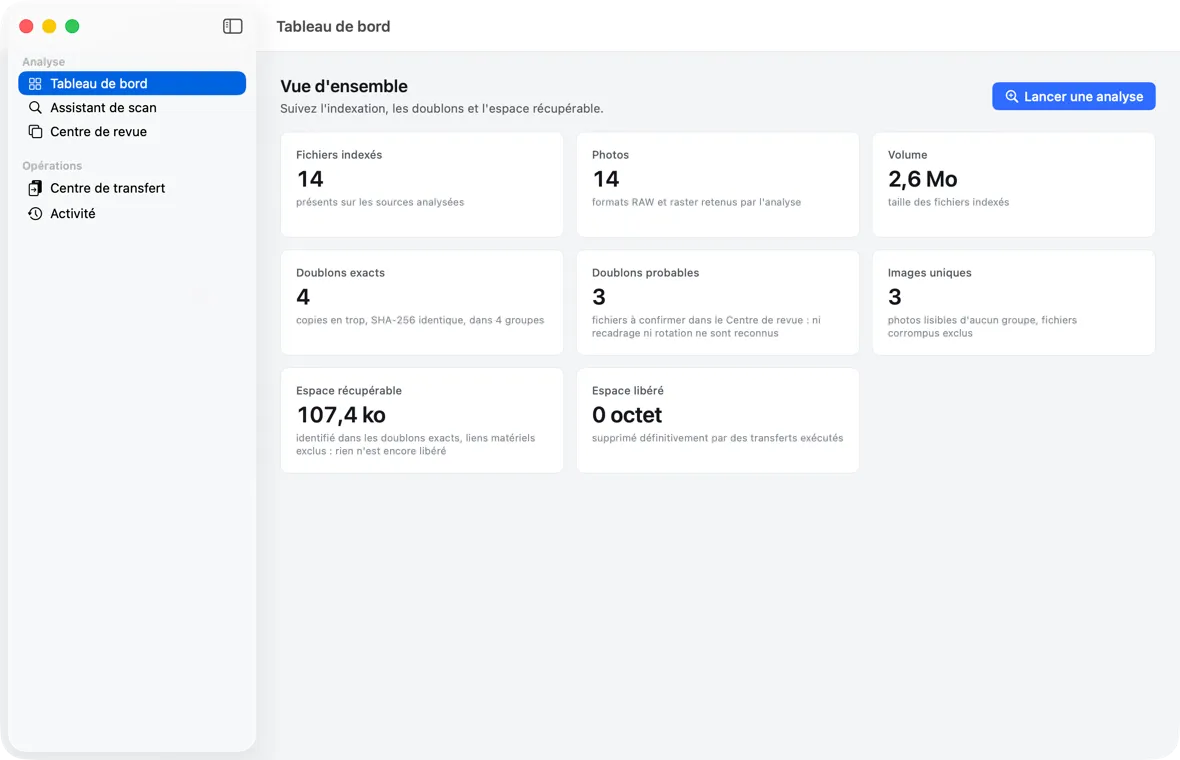
Find duplicates
Consolidate with verified copies
Why
Photos everywhere, and no certainty.
External drives, memory-card copies, exports: over the years, a collection scatters and duplicates itself. Obscura Trace establishes what you own, and touches nothing until you have read what it will do.
Copies on several drives
The analysis compares contents by SHA-256 checksum: an exact duplicate is a verified fact, not a similar file name.
Versions that look alike
dHash and pHash visual fingerprints match an image that was recompressed, resized, or converted to black and white.
Which copy to keep?
The master is recommended by a seven-criterion rule, explained line by line. The decision stays yours.
Fear of losing an original
Nothing is deleted without your consent: the sources of a move go to the Trash, which the app never empties.
An interrupted transfer
Every operation is journaled before it happens: resuming knows where it stood and never recopies what is verified.
Forgotten provenance
The manifest written at the destination tells, for each file, where it came from and what its checksum is.
Method
From inventory to manifest, with no blind spot.
Obscura Trace always follows the same path, and every step that writes to a drive waits for your confirmation.
- 01
Choose
Pick the drives or folders to analyze. Obscura Trace reads them, writes nothing there, and keeps a bookmark to find them again.
- 02
Analyze
Inventory, metadata, SHA-256 and visual fingerprints: five phases tracked one by one, paused or resumed at will.
- 03
Review
Go through the duplicate groups, read why a given copy is recommended as the master, and decide.
- 04
Plan
Dry-run the transfer to a clean library, then compute the real plan: nothing is written yet.
- 05
Confirm
Read what will be written, what will go to the Trash, and what would be irreversible, then run it.
- 06
Trace
Every copy is verified, every operation journaled before it happens, and the manifest tells where each file came from.
Features
The standards of backup, the clarity of a Mac app.
Every screen says what it knows, what it estimates, and what it will do, before doing it.
Exact and visual duplicates
An exact duplicate is established by the full SHA-256 checksum. Visual duplicates are matched by two appearance fingerprints, dHash and pHash, within 10 bits.

Review Center
Duplicate groups, filtered by kind, with the confidence of each match: established when the content is identical, otherwise estimated and labeled as such.

Recommended, explained master
In each group, the copy to keep first is recommended by a seven-criterion rule scored out of 100, explained criterion by criterion.

Dry run and transfer plan
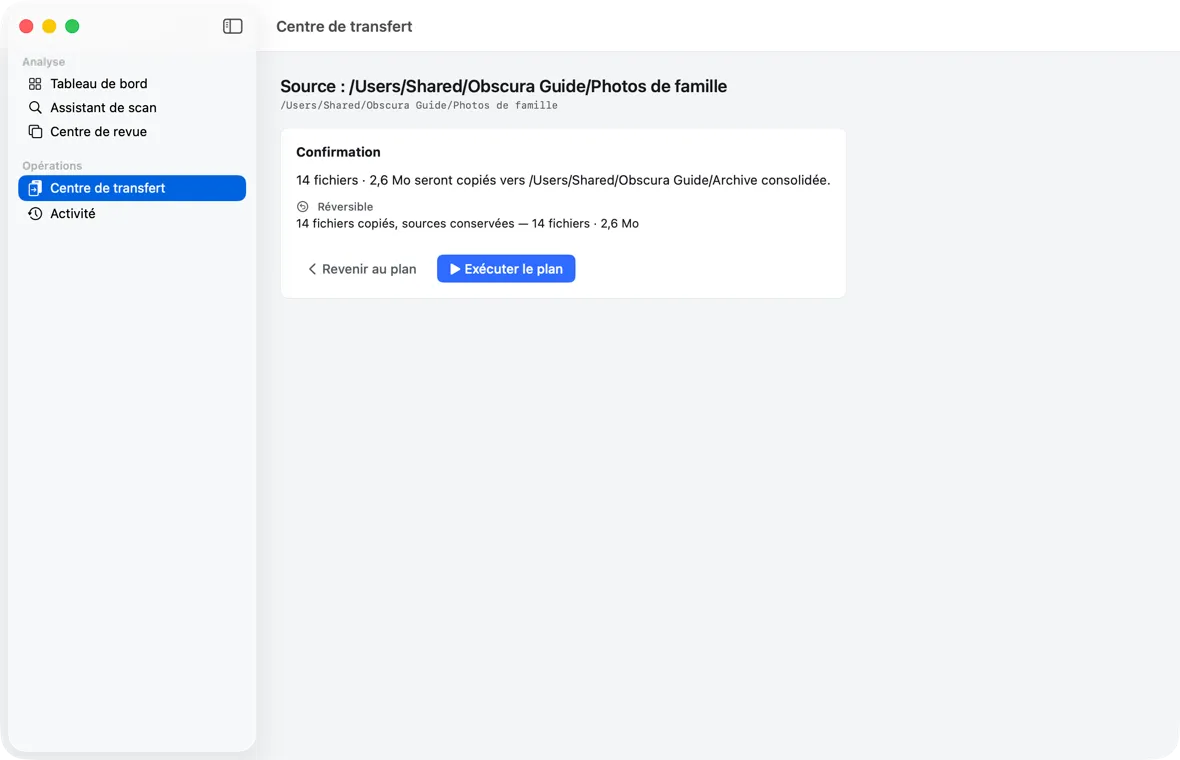
Before writing anything, the Transfer Center computes the exact list of operations: a dry run to read, then a real plan compared with that dry run.

Confirmation, Trash by default
The confirmation sorts every operation by reversibility. The sources of a move go to the drive's Trash, which the app never empties.

Verified copy and resume
Each copy is written under a temporary name, checked by SHA-256 and reread from disk, before it takes its final name. The journal is written before each operation.

Review
The app recommends, you decide.
The Review Center shows each group, the recommended master, and how its score was reached. Established confidence is a verified fact; estimated confidence is always labeled as such. No action on this screen modifies a file.
The Review Center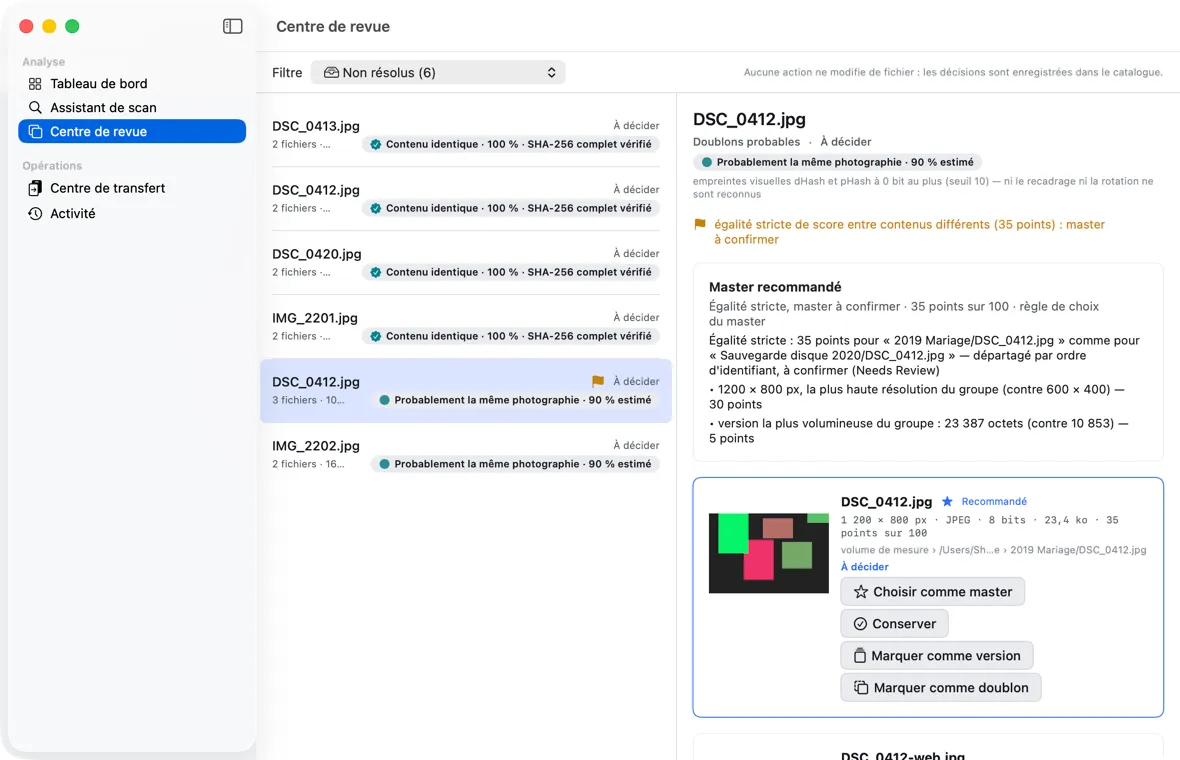
Transfer
Read the plan before it runs.
The Transfer Center runs a dry run, computes the real plan, then shows you what will be written, what will go to the Trash, and what would be irreversible. Nothing runs before you confirm.
The Transfer CenterPrinciples
Local, careful, traceable.
The product handles irreplaceable archives. Its promises are those of backup software.
100% local
Your photos, metadata, and catalog never leave your Mac. No analysis engine uses the network; the update check is off by default.
Read-only by default
The analysis and the Review Center only read and record your decisions. Only the Transfer Center writes, after a confirmation you approve.
Trash by default
Moved sources go to the drive's Trash, which the app never empties. Permanent deletion is off by default.
Copy, verify, then remove
A move is a copy verified by SHA-256; the original is removed only afterwards. Nothing is silently overwritten.
Journal before action
Every operation is written to the journal before it happens: after a power cut, resuming knows exactly where it stood.
When in doubt, keep
A false positive costs more than a missed duplicate: similarity thresholds are conservative, and the product recommends without deciding for you.
Who it's for
For anyone with photos on several drives.
No technical skill is needed for the app; the command line is there for those who want it.
Photographers
External drives, memory-card copies, and exports piling up: know what you really own.
Archivists and picture researchers
Consolidate a collection without losing a single original or a single XMP edit file.
Advanced users
Automate and verify with the obscura command line, on the same catalog as the app.
FAQ
Frequently asked questions.
File safety, duplicates, the Trash, and privacy.
What is Obscura Trace?
A native macOS app that inventories your photo drives, finds exact (SHA-256) and visual (dHash, pHash) duplicates, recommends the copy to keep, and helps you consolidate your archives to a new location through verified copies, destroying nothing without your consent.
Can the analysis damage my files?
No. The analysis only reads: it writes, moves, renames, and deletes nothing in your sources. Everything it learns goes into the catalog.
Does marking a file as a duplicate delete it?
No. No action in the Review Center touches a file: decisions are recorded in the catalog, and “Rouvrir le groupe” (Reopen group) undoes them. When transferring, a file marked as a duplicate, while a present master exists, is neither copied nor moved: it stays in the source.
Do my photos go to the internet?
No. All processing is local. The only possible connection is the update check, off by default, which only reads the list of published releases and sends nothing about your photos or your catalog.
Why are my moved files still on the source drive?
They are in that drive's Trash: a move puts the sources there after their copy is verified, and the app never empties the Trash. Until you empty it, the space is not freed (that is the “recoverable space”).
Can I permanently delete the sources?
Yes, but only if you allow it in Settings, through a confirmation where the Return key picks “Cancel”, then consent to it for the transfer, and finally acknowledge the irreversibility on the confirmation screen. It is off by default.
Next step
Find out what your drives really hold.
Obscura Trace is signed with Developer ID and notarized by Apple. macOS 14 Sonoma or later.